Sticker Notes: Adding Playful Flair to Modern Typography
In the crowded landscape of digital design, where sans serif and serif fonts dominate the conversation, there is a specific niche for typefaces that prioritize personality over pure legibility. Sticker Notes is a prime example of a creative font that steps outside the box of traditional text formatting. As a dingbat font, it functions less like a standard alphabet and more like a curated library of graphic design assets. Each keystroke generates a distinct, colorful sticky note shape rather than a letter, offering a unique tool for designers, marketers, and content creators looking to inject energy into their visual storytelling.
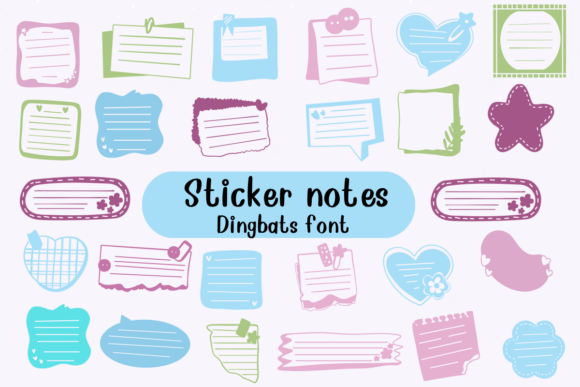
For the uninitiated, a dingbat font is a typeface where the keys map to symbols or shapes rather than alphanumeric characters. With Sticker Notes, the "glyphs" are designed to mimic the aesthetic of office and stationery sticky notes, but with a digital twist. The visual style is inherently playful, featuring bright colors, soft shadows, and irregular shapes that suggest paper floating on a screen. This type of premium font is invaluable for anyone working on projects that require a human touch without the complexity of sourcing individual vector illustrations. It bridges the gap between typography and illustration, allowing creators to "type" their graphics directly into existence.
The Visual Character of Sticker Notes
The primary appeal of Sticker Notes lies in its versatility as a display font alternative. While you wouldn't use it to write a paragraph of body copy, it excels at creating visual anchors. The designs range from simple squares and rectangles to more complex die-cut shapes like stars, hearts, and speech bubbles. The color palette is vibrant, ensuring that the elements pop against both light and dark backgrounds. This characteristic makes it an excellent choice for social media graphics, where grabbing attention within the first second of a scroll is critical.
Unlike a static image file, using Sticker Notes as a font offers significant flexibility in layout software. You can adjust the color of the notes (depending on how the font is vectorized), scale them without pixelation, and align them perfectly using standard text tools. This fluidity is a massive advantage for web design and editorial design. For instance, a blogger can use these characters to highlight key takeaways in an article, creating a visual hierarchy that guides the reader’s eye to the most important information. It transforms standard text layouts into dynamic, interactive-feeling experiences.
Strategic Applications for Brands and Businesses
For small business owners and entrepreneurs, brand consistency is key. However, consistency doesn't have to mean boring. Incorporating a creative font like Sticker Notes into your brand identity toolkit can help soften a corporate image or energize a startup vibe. It works particularly well for industries related to education, stationery, event planning, and lifestyle coaching. When used in packaging design, these shapes can serve as callouts for "New," "Sale," or "Best Seller," mimicking the look of handwritten notes added to a product.
Marketers can leverage this typeface to enhance visual hierarchy in email newsletters and flyers. Instead of using standard bullet points, a designer might use a specific sticky note shape from the Sticker Notes font to create a custom list style. This small detail can significantly increase audience engagement because it breaks the monotony of standard text formatting. It signals to the viewer that the content is curated and intentional, which builds trust and recognition over time.
Practical Guide to Font Pairing and Integration
When integrating a specialized typeface like Sticker Notes into a project, the most critical factor is font pairing. Because Sticker Notes is loud, colorful, and decorative, it pairs best with clean, neutral typefaces. A classic sans serif font (like Helvetica, Open Sans, or Roboto) or a traditional serif font (like Times New Roman or Georgia) provides the necessary visual contrast. If you pair Sticker Notes with another script font or handwritten font, the result can quickly become chaotic and difficult to read, undermining the professionalism of your design.
Here is a practical workflow for testing this asset in your next project:
- Evaluate the Context: Assess if the tone of your project allows for playfulness. A legal document or a corporate annual report is not the place for sticky notes. However, a party invitation, a podcast cover, or a children's educational worksheet is the perfect environment.
- Check the Glyph Map: Before purchasing or downloading, check the character map. A high-quality premium font will offer a wide variety of shapes. You want enough diversity to differentiate between different types of callouts or notes without repeating the exact same shape too frequently.
- Readability First: If you plan to place text on top of the sticky note shapes, ensure there is enough contrast. The shapes in Sticker Notes often have texture or gradients. You may need to add a semi-transparent overlay behind your text or use a bold, dark typeface to ensure the message remains legible.
- Licensing and Usage: Always verify the licensing terms. If you are creating logo design elements or merchandise for sale, you need a commercial license. Many free fonts are for personal use only, so reading the fine print is essential for maintaining brand integrity.
Enhancing Digital and Print Projects
The utility of Sticker Notes extends across both digital and physical mediums. In the realm of web design, these characters can be used as "loaders," decorative bullet points, or background elements that add depth to a flat layout. Because they are vector-based (assuming a .ttf or .otf format), they remain crisp on high-resolution Retina screens, ensuring your site looks polished on mobile devices and desktops alike.
In print, the application is just as broad. For packaging design, using a dingbat font can reduce the need for expensive custom illustration in the early stages of a project. It allows you to mock up concepts quickly. For publishers, Sticker Notes can be used in margins to highlight tips, warnings, or fun facts in educational materials or magazines. It adds a layer of tactile realism, making the digital page feel like a physical desk.
Final Thoughts on Modern Typography Tools
Modern design is about efficiency and personality. Tools like Sticker Notes represent a shift in how we view design assets. They are not just fonts; they are visual shortcuts that allow for rapid prototyping and creative expression. Whether you are a seasoned graphic designer looking for a quick way to annotate mockups, or a small business owner trying to create your own social media content, this typeface offers a practical solution. By combining the structural integrity of type with the whimsy of illustration, Sticker Notes helps you communicate with clarity and a smile.