Biscuit Crisp: The Cookie-Inspired Display Font
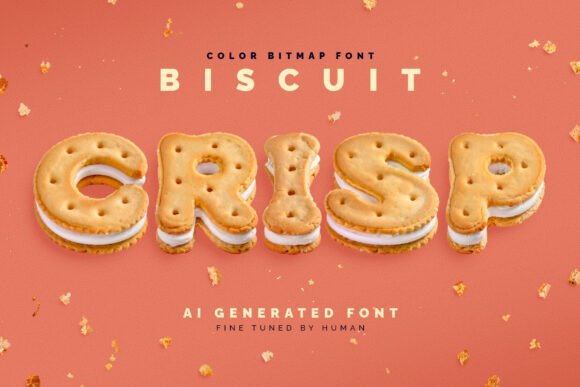
In the crowded world of typography, finding a typeface that genuinely stops a scroll or catches a wandering eye is a significant win for any designer. Biscuit Crisp enters the scene as a unique solution for projects that demand personality and a tactile feel. At first glance, the letters appear as if they have been sculpted from actual sandwich cookies, complete with realistic textures, shadows, and that familiar crumbly aesthetic. It is a color bitmap font, technically classified as an OpenType-SVG file. This means the font contains high-fidelity image data rather than simple vector outlines, allowing for the intricate details that make the "biscuit" texture pop off the screen. While it leans heavily into a novelty category, the craftsmanship involved makes it a serious tool for specific creative needs.
The Technology Behind the Texture
The creation of Biscuit Crisp represents an interesting intersection of modern technology and manual artistry. The foundation of the font was built using generative AI, which helped conceptualize the complex geometry and texture mapping required to turn letters into baked goods. However, relying solely on AI often results in artifacts or inconsistencies that break the immersion. To solve this, the assets underwent manual fine-tuning. This human touch ensured that the kerning (the space between letters) felt natural and that the visual weight remained consistent across the alphabet. The result is a premium font that feels organic and playful, avoiding the uncanny valley look that sometimes plagues AI-generated imagery.
Technically, users are working with a color bitmap format. For those unfamiliar, this is a significant evolution in modern typography. Unlike standard vector fonts that rely on a single color (usually black), color fonts can contain multiple colors, gradients, and transparency within the glyph itself. Biscuit Crisp capitalizes on this by presenting full-color, pre-rendered cookies. Because it is packaged as an OpenType-SVG file, it installs and functions just like a standard .OTF file on your operating system, making the workflow relatively seamless for designers accustomed to standard typefaces.
Practical Applications and Brand Strategy
Understanding where to deploy a display font like Biscuit Crisp is crucial for maintaining professionalism. This is not a typeface for body text or legal disclaimers; its strength lies in headlines, logos, and branding elements where impact is the primary goal. For packaging design, particularly in the food industry, the font is an immediate visual shorthand. Imagine a bakery box, a snack label, or a café menu board using this typeface for headers. It instantly communicates "homemade," "delicious," and "fun" without needing a lengthy explanation.
In brand identity, consistency is key. If a brand’s voice is whimsical, nostalgic, or family-oriented, Biscuit Crisp can serve as a cornerstone asset. It works exceptionally well for:
- Social Media Graphics: Creating thumb-stopping content for Instagram stories or YouTube thumbnails.
- Event Invitations: Designing flyers for bake sales, birthday parties, or community gatherings.
- Logo Design: Crafting wordmarks for confectioneries, ice cream parlors, or lifestyle blogs focused on cooking.
- Editorial Design: Adding a playful break in lifestyle magazines or children's books.
However, restraint is a designer's best friend. Using Biscuit Crisp for an entire website or a dense brochure would likely overwhelm the reader. It is best used sparingly to maximize its charm. When paired correctly, it can elevate a standard layout into something memorable. The key is to treat it as the star of the show, allowing the surrounding design elements to act as the supporting cast.
Technical Specifications and Limitations
Before purchasing or downloading, it is vital to understand the technical boundaries of Biscuit Crisp. The font supports the English language and basic punctuation. If your project requires extended Latin characters, Cyrillic, or Greek alphabets, this particular typeface will not cover those needs. Always review the included screenshot or character map provided by the creator to ensure the specific glyphs you need are available.
Furthermore, as a color bitmap font, it behaves differently than a standard sans serif font or serif font. It cannot be resized infinitely without potentially losing quality, though the included files are high-resolution (averaging 1500x1500 pixels per glyph), which is sufficient for most digital and moderate-sized print applications. The package includes full-resolution PNG files with transparent backgrounds, offering designers the flexibility to use the letters as standalone image assets in software that might not support OpenType-SVG.
Software Compatibility and Workflow
One of the most common pitfalls with color fonts is software compatibility. While the technology is advancing, not all applications render color bitmaps correctly. Biscuit Crisp is designed to work seamlessly with industry-standard creative software. If you are using Adobe Photoshop, Illustrator, InDesign, or Affinity Designer, you should be able to select the font from your type menu and type as usual. Procreate users on the iPad can also utilize this font, which is excellent for sketching out layouts on the go.
However, if you are using older versions of these programs, basic text editors, or some web builders, the font might appear as a black-and-white silhouette or fail to render entirely. This is a limitation of the host software, not the font itself. For web designers, embedding this font directly into a site via CSS can be complex due to file size and rendering differences across browsers. It is often safer to rasterize the text (turn it into an image) in Photoshop or Illustrator before uploading it to a website, ensuring the visual fidelity remains intact for all visitors.
Font Pairing and Design Hierarchy
Pairing a novelty font requires a careful eye to avoid visual chaos. Because Biscuit Crisp is textured, bold, and playful, it demands a partner that is calm, clean, and readable. A common mistake is pairing two "loud" fonts together, which creates a shouting match on the page.
For a balanced visual hierarchy, consider pairing Biscuit Crisp with a neutral sans serif font or a clean geometric typeface. The contrast between the organic, crumbly texture of the cookies and the sharp, mathematical precision of a modern sans serif creates a pleasing tension. Alternatively, a simple script font could work if you are aiming for a "bakery chalkboard" aesthetic, provided the script is legible and not overly ornate.
Here is a practical approach to testing your pairings:
- Set the Scene: Place your headline in Biscuit Crisp.
- Choose the Body: Select a standard, highly legible font for your paragraph text (e.g., Open Sans, Roboto, or Helvetica).
- Check the Scale: Ensure the cookie font is large enough to appreciate the texture but not so large that it becomes abstract.
- Assess the Mood: Does the combination feel like a cohesive brand voice? If the body text feels too stiff, try a friendlier sans serif.
Evaluating the Commercial Value
For entrepreneurs and small business owners, the decision to invest in a creative font comes down to utility. Biscuit Crisp is a specialized tool. If your business deals in food, hospitality, or children's entertainment, this asset can significantly reduce the time spent on graphics. Instead of hunting for stock images of cookies to arrange into letters, you simply type out your message.
Consider the longevity of the asset. Because it is a commercial font, you are paying for the license to use it in client work or your own business materials. Ensure the license covers your intended use, particularly if you plan to sell merchandise (like t-shirts or mugs) featuring the text. The inclusion of the PNG files adds extra value, allowing you to use the letters in non-design software or for physical crafts like scrapbooking and sticker making.
Ultimately, Biscuit Crisp is more than just a novelty; it is a piece of modern typography